What You Need To Know
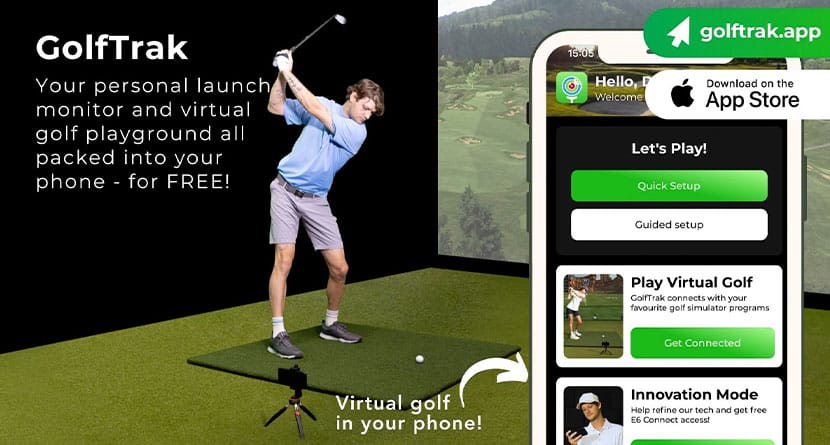
- GolfTrak turns your iPhone into a golf launch monitor and simulator, requiring no extra hardware beyond a phone and simple tripod setup.
- In testing against a Uneekor XO simulator, GolfTrak delivered carry-distance accuracy within roughly 2–3%, making it a legitimate home practice tool.
- A free version lets golfers try it risk-free, while the $99 Pro upgrade unlocks full shot data, analytics, and simulator play through GSPro and E6 Connect.
Every golfer eventually runs into the same problem.
You want to practice more — really practice — but life, weather, cost, and access to good facilities tend to get in the way. Full simulator setups look amazing online, but once you realize they can cost anywhere from five to twenty thousand dollars, most of us quietly close the browser tab and head back to the driving range.
That’s where GolfTrak caught our attention.
The idea sounds almost too simple: download an app, place your iPhone behind the golf ball, and suddenly you’ve got launch monitor data and simulator capability without buying any hardware at all.
Naturally, I was skeptical. Golf technology usually obeys one rule — accuracy costs money.
So I put GolfTrak through real testing, including side-by-side comparison against a professional indoor simulator setup, to answer the only question that matters:
Is this actually useful for golfers trying to get better?
First Impressions
GolfTrak markets itself as a “no hardware required” solution, and technically that’s true. But like most things in golf, setup rewards a little patience.
Phone placement matters more than you might expect.
I quickly learned that a cheap iPhone tripod — mine cost about five bucks — makes a massive difference. The app suggests you can prop your phone up with books or random household objects, but consistency is everything here. Once I marked where the tripod and hitting position lived in my simulator bay, sessions became smooth and repeatable.
GolfTrak walks you through setup using both voice prompts and visual cues. The phone flashlight blinks as you dial things in, and once everything lines up, the app gives you a satisfying “Ready” confirmation.
From there? Hit shots.
Replace ball. Swing. Repeat.
And honestly, that simplicity is where GolfTrak starts to win people over.
The Dashboard Is Sneaky Good
One pleasant surprise was the app’s dashboard.
After a session, GolfTrak gives you a clean breakdown of your practice — carry distance, ball speed, club speed, launch angle, and session trends over time. It’s approachable without feeling dumbed down, which is harder to pull off than it sounds.
Even better, the app records swing video using your phone and pairs it directly with shot data. You can immediately see what you did and what the ball did, which is incredibly helpful for self-coaching.
Is it high-speed studio camera quality? Of course not. It’s an iPhone.
But for everyday practice feedback, it works surprisingly well.
GolfTrak also connects to simulator platforms like E6 Connect and GSPro, meaning you can actually play real golf courses using nothing more than your phone setup — though those integrations come with additional subscriptions.
Still, the idea of playing Pebble Beach off a net in your garage using only your phone feels a little wild the first time you do it.
How GolfTrak Stacks Up
This is where things got interesting.
GolfTrak claims accuracy approaching professional launch monitors, so I compared it directly against a Uneekor XO, a ceiling-mounted system commonly found in serious simulator installations.
Same golfer. Same session. Same indoor environment.
I hit a series of shots with an 8-iron and a driver while recording data from both systems.
After normalizing everything into yards, the results were honestly impressive.
Accuracy Results
-
8-Iron: ~98.6% accurate
-
Driver: ~97.1% accurate
-
Overall carry distance accuracy: roughly 97–98%
Most shots were only a few yards apart.
That’s an important distinction. GolfTrak isn’t physically measuring the golf ball the way radar or photometric launch monitors do — it’s modeling ball flight using camera data and AI algorithms.
And yet, for everyday practice distances, the numbers held up extremely well.
Will this replace a professional club fitting session? No.
But for dialing in yardages, practicing indoors, or understanding how consistently you strike the ball? It absolutely holds its own.
View this post on Instagram
The Takeaway
GolfTrak isn’t trying to replace a $15,000 simulator.
What it does — and does surprisingly well — is remove the biggest barrier golfers face: getting meaningful feedback without spending a fortune.
If you’re: building a budget home setup, hitting into a garage net, practicing more seriously at home, or just curious about launch monitor data, GolfTrak makes a lot of sense.
The free version lets you experiment without commitment, while the $15/monthly or $99/annual Pro upgrade unlocks the real depth of the platform — and in my experience, it’s worth it if you plan to use the app regularly.